Overview
Once you've accepted a payment in iProcess, you can easily manage that transaction within the app. This includes viewing your recent sales, issuing refunds or voids, and sending receipts. These tools help keep your records accurate and your customers informed.
Viewing Recent Transactions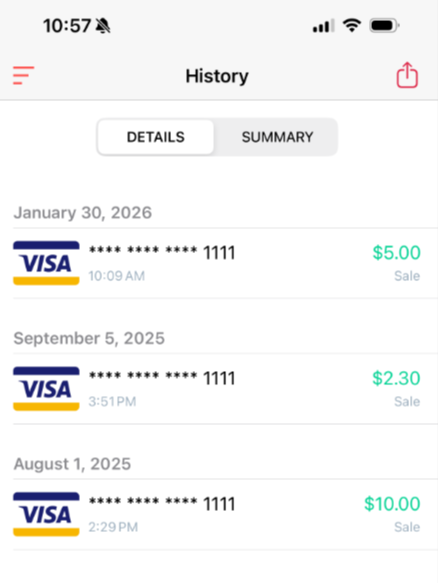
- Open the iProcess app
- Tap the Menu icon (three bars in the top left)
- Tap History to view your latest transactions
- Tap Summary to filter by date range or search for specific transactions
Each transaction will show the status, amount, date, and card details (last four digits only).
Issuing Refunds
- Go to Menu → History
- Select the transaction you want to refund
- Tap the three dots in the top-right corner → choose Refund
- Confirm the amount, then press Refund to complete
Note: Refunds may take a few business days to appear on the customer’s statement.
Voiding a Transaction
Voids are used to cancel a sale before it settles (usually within the same business day).
- Go to Menu → History
- Select the transaction
- Tap the three dots in the top-right corner
- Press Void to complete
Tip: If the transaction has already settled, use a refund instead. Some processors settle transactions at different times during the day. If you cannot void the transaction, it most likely has settled already.
Emailing or Printing Receipts
You can resend a receipt at any time right from the App:
- Go to Menu → History
- Select the transaction
- Tap the Share icon (arrow) in the top-right corner
- Choose to send via email, text, or print (based on your device settings)
Reminder: iProcess uses your phone’s native email provider and messaging apps to send receipts.
Export a CSV file of Transactions
You can export a list of your transactions from the iProcess app as a CSV file.
- Go to Menu → History
- Tap the Details tab
- Tap the Share icon (arrow) in the top-right corner
- Choose how you want to share the exported file (based on your device settings)
Note: Available sharing options may vary depending on your phone/tablet settings.
Common Questions
Can I refund only part of a payment?
Yes, iProcess allows partial refunds. Just adjust the refund amount before submitting.
What if I don't see a Void option?
The Void option only appears if the transaction hasn’t settled yet.
Can I print a receipt from the app?
Yes, if your mobile device is connected to a compatible receipt printer.